Leading Authors of Today's Magazine
  • Home
  • Editorial
  • Featured New Authors
  • Anthologies
    • Moguls Unleashed
      • Dr. Dashnay Holmes is a Dynamic Entrepreneur!
      • Dr. Jane Mukami
      • Dr. Demaryl Roberts-Singleton
      • Dr. Desirie Sykes
      • Dr. Terry Golightly
      • Dr. Shontae Davidson
      • Dr. Adrienne Velazquez
      • Dr. Nichole Pettway
      • Dr. Daniela Peel: Corporate Wellness
  • News and Updates
  • More
    • Multimedia
    • Author of the Month
    • Book Reviews
    • Interviews and Conversations
    • Community and Engagement
    • Writing Resources
    • Genre Explorations
No Result
View All Result
Leading Authors Of Today's Magazine
No Result
View All Result

How to Use Voice Input to Type on Your Samsung Galaxy Tablet

July 7, 2024
in How-to
0
Home How-to
0
SHARES
0
VIEWS
Share on FacebookShare on Twitter
How to Use Voice Input to Type on Your Samsung Galaxy Tablet


Your Samsung Galaxy tablet has the amazing capability to interpret your utterances as text. It works almost as well as computer dictation in science fiction movies, though you won’t find the command to launch photon torpedoes.

How to activate voice input on your Samsung Galaxy Tablet

To ensure that the tablet’s dictation feature is active, obey these steps:

  1. Display the onscreen keyboard.

    Touch a text box or somehow get the onscreen keyboard to appear.

  2. Choose the keyboard notification icon.

    Look up yonder in the notification area for an icon that looks like a keyboard. Pull down the notification shade and touch that item, titled Select Input Method.

    image0.jpg
  3. Choose Google Voice Typing.

    You’re good.

Voice typing appears the instant you activate it. If you don’t want to utter anything at the moment, tap the screen or touch the Back button.

How to dictate input on your Samsung Galaxy Tablet

Talking to your tablet really works, and works quite well, provided that you touch the Microphone key on the keyboard and properly dictate your text.

After touching the Microphone key, you see a special window at the bottom of the screen. When the Speak Now text appears, dictate your text; speak directly at the tablet.
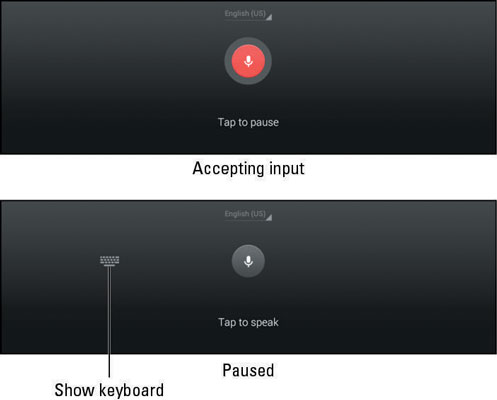
image1.jpg

As you speak, the Microphone icon on the screen flashes. The flashing doesn’t mean that the tablet is embarrassed by what you’re saying. No, the flashing merely indicates that your words are being digested.

The text you utter appears as you speak. To pause, touch the Tap to Pause text on the screen. To use the keyboard, touch the Keyboard icon just to the left of the Microphone icon. Or to continue dictation, touch the Tap to Speak text.

  • The first time you try voice input, you might see a description displayed. Touch the OK button to continue.

  • The better your diction, the better your results.

  • You can’t use dictation to edit text. Text editing still takes place on the touchscreen.

  • Speak the punctuation in your text. For example, you would say, “I’m sorry comma and it won’t happen again” to produce the text I’m sorry, and it won’t happen again.

  • Common punctuation you can dictate includes the comma, period, exclamation point, question mark, and colon.

  • You can’t dictate capital letters. If you’re a stickler for such things, you’ll have to go back and edit the text.

  • Dictation may not work without an Internet connection.

How to utter s**** words on your Samsung Galaxy Tablet

Both the Galaxy Note and Galaxy Tab feature a voice censor. It replaces those naughty words you might utter, placing the word’s first letter on the screen, followed by the appropriate number of asterisks.

For example, if spatula were a blue word and you uttered spatula when dictating text, the dictation feature would place s****** on the screen rather than the word spatula.

Yeah, silly. Or s****.

The tablet knows a lot of blue terms, including the infamous “Seven Words You Can Never Say on Television,” but apparently the terms crap and damn are fine



Credit goes to @www.dummies.com

Previous Post

Hilary Mantel: The Waterstones Interview – Wolf Hall Trilogy

Next Post

Most Recommended Books From Wellness Mama Podcast Guests

Next Post
Most Recommended Books From Wellness Mama Podcast Guests

Most Recommended Books From Wellness Mama Podcast Guests

Leave a Reply Cancel reply

Your email address will not be published. Required fields are marked *

Random News

AKU celebrates Authors’ Day | The Aga Khan University News

AKU celebrates Authors’ Day | The Aga Khan University News

...

Book launches aplenty: here’s what you should check out at GTLF 2023

Book launches aplenty: here’s what you should check out at GTLF 2023

...

In Author Laura van den Berg’s Latest Novel, Things Are Getting Weird in Florida

In Author Laura van den Berg’s Latest Novel, Things Are Getting Weird in Florida

...

Environmental non-fiction books for all ages

Environmental non-fiction books for all ages

...

How Chris Judge’s daughters inspired his newest evil creation

How Chris Judge’s daughters inspired his newest evil creation

...

Interview: Len Deighton Collects Outdated Travel Guides

Interview: Len Deighton Collects Outdated Travel Guides

...

About us

Today's Author Magazine

Welcome to Today's Author Magazine, the go-to destination for discovering fresh talent in the literary world. We shine a light on new authors and captivating anthologies, providing readers with a diverse array of stories and insights. Here's a look at the vibrant categories that make up our magazine

RecentNews

Bishop Funke Adejumo: Writing Her Legacy Into Nations

Elevating Leadership, Empowering Women: The Journey of Dr. Janet Lockhart-Jones

Leading with Words: The Transformational Journey of Dr. Mark Holland

Faith, Healing, and Resilience: The Empowering Voice of Elaine King

Categories

  • Anthologies
  • Author of the Month
  • Book Reviews
  • Community and Engagement
  • Editorial
  • Featured
  • Featured New Authors
  • Genre Explorations
  • Global Influence
  • How-to
  • Interviews and Conversations
  • Multimedia
  • News and Updates
  • Other
  • Uncategorized
  • Writing Resources

RandomNews

How to write a BOOK REVIEW (3 Simple Steps Explained)| Make Money Writing Reviews

How To Avoid Buying Fake Books Online

Home With Your Kids? Writers Want to Help

Freestyle Acquires South African Film Anthology “Hyperlink”

Answers to all your questions about the Kindle Unlimited reading subscription

  • Home
  • About
  • Privacy
  • Terms
  • Contact

© 2024 Today's Author Magazine. All Rights Are Reserved.

No Result
View All Result
  • About
  • Contact
  • Home
  • Moguls Unleashed
  • Privacy
  • Terms

© 2024 Today's Author Magazine. All Rights Are Reserved.