
Looking for the best free speech to text software on Windows?
The best speech-to-text software is Dragon Naturally Speaking (DNS) but it comes at a price. But how does it compare to the best of the free programs, like Google Docs Voice Typing (GDVT) and Windows Speech Recognition (WSR)?
This article compares Dragon against Google Docs Voice Typing and Windows Speech Recognition for three typical uses:
- Writing novels.
- Academic transcription.
- Writing business documents like memos.
Comparing Speech Recognition Software: Dragon Vs. Google Vs Microsoft
We will look at the nuances between the three below, but here’s an overview on their pros and cons which will help you quickly make a decision.
1. Dragon Speech Recognition
Dragon Naturally Speaking beats Microsoft’s and Google’s software in voice recognition.
DNS scores 10% better on average compared to both programs. But is Dragon Naturally Speaking worth the money?
It depends on what you’re using it for. For seamless, high-accuracy writing that will require little proof-reading, DNS is the best speech-to-text software around.
2. Windows Speech Recognition
If you don’t mind proofreading your documents, WSR is a great free speech-recognition software.
On the downside, it requires that you use a Windows computer. It’s also only about 90% accurate, making it the least accurate out of all the voice recognition software tested in this article.
However, it’s integrated into the Windows operating system, which means it can also control the computer itself, such as shutdown and sleep.
3. Google Docs Voice Typing
Google Docs Voice Typing is highly limited in how and where you use it. It only works in Google Docs, in the Chrome Browser, and with an internet connection.
But it offers several options on mobile devices. Android smartphones have the ability to transcribe your voice to text using the same speech-to-text engine that also works with Google Keep or Live Transcribe.
And while Dragon Naturally Speaking offers a mobile app, it’s treated as a separate purchase from the desktop client.
Dragon and Microsoft work in any place you can enter text. However, WSR can execute control functions whereas Dragon is mostly limited to text input.
Download: Live Transcribe for Android (Free)
Speech-to-Text Testing Methods
In order to test the accuracy of the dictation with the tools, I read aloud three texts:
- Charles Darwin’s “On the Tendency of Species to Form Varieties”
- H.P. Lovecraft’s “Call of Cthulhu”
- California Governor Jerry Brown’s 2017 State of the State speech
When a speech-to-text software miscapitalized a word, I marked the text as blue in the right-column (see graphic below). When one of the software got a word wrong, the misspelled word was marked in red. I did not consider wrong capitalizations to be errors.
I used a Blue Yeti microphone which is the best microphone for podcasting and a relatively fast computer. However, you don’t need any special hardware. Any laptop or smartphone transcribes speech as well as a more expensive machine.
Test 1: Dragon Naturally Speaking Speech-to-Text Accuracy
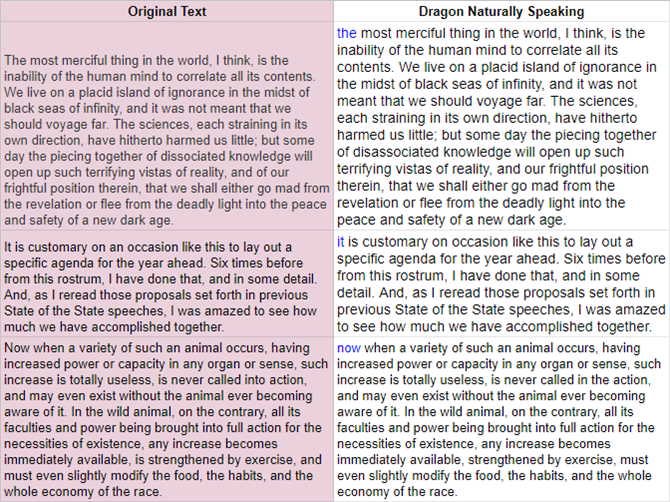
Dragon scored 100% on accuracy on all three sample texts. While it failed to capitalize the first letter on every text, it otherwise performed beyond my expectations.
While all three transcription suites do a great job of accurately turning spoken words into written text, DNS comes out way ahead of its competitors. It even successfully understood complicated words such as “hitherto” and “therein”.
Test 2: Google Docs Voice Typing Speech-to-Text Accuracy
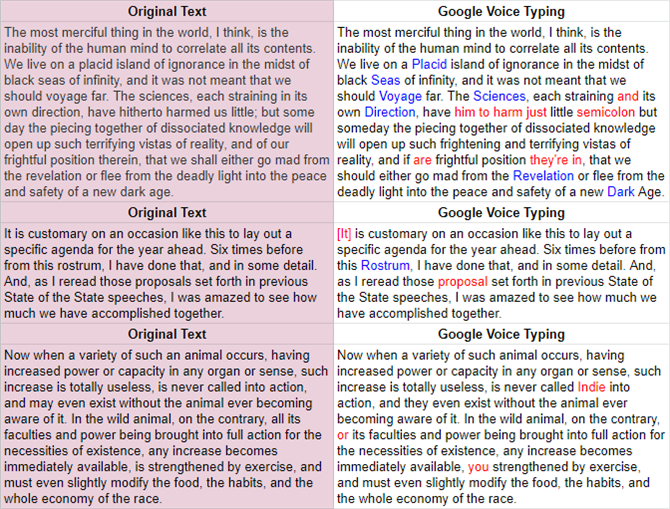
Google Docs Voice Typing had many errors compared to Dragon. GDVT got 93.5% right on Lovecraft, 96.5% correct for Brown, and 96.5% for Darwin. Its average accuracy came out to around 95.2% for all three texts.
On the downside, it automatically capitalized a lot of words that didn’t need capitalization. It seems the engine also hasn’t improved in accuracy since I last tested GDVT three years ago.
Test 3: Microsoft Windows Speech Recognition Text-to-Speech Accuracy
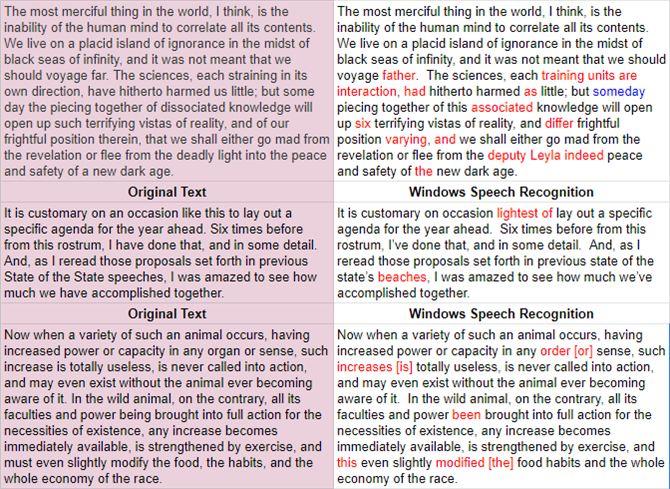
Microsoft’s Windows Speech Recognition came in last. Its accuracy on Lovecraft was 84.3%, although it did not miscapitalize any words like GDVT. For Brown’s speech, it got its highest accuracy rating of around 94.8%, making it equivalent to GDVT.
For Darwin’s book, it managed to get a similarly high score of 93.1%. Its average accuracy across all texts came out to 89%.
Are Free Transcription Services Worth Using?
- Dragon Naturally Speaking got a perfect 100% accuracy for voice transcription.
- Microsoft’s free voice-to-text service, Windows Speech Recognition scored an 89% accuracy.
- Google Docs Voice Typing got a total score of 95.2% accuracy.
However, there are some major limitations to free text-to-speech options you should always keep in mind.
GDVT only works in the Chrome browser. On top of that, it only works for Google Docs. If you need to enter something in a spreadsheet or in a word processor other than Google Docs, you are out of luck.
Our test results indicate it is more accurate than WSR, but you have to keep in mind that it only works in Chrome for Google Docs. And you will always need an internet connection.
WSR can make you more productive with its hands-off computer automation features. Plus, it can enter text. Its accuracy is the weakest out of the services that I tested.
That said, you can live with its misses if you are not a heavy transcriber. It’s on par with Google Docs Voice Typing but limited to Windows.
For most users, the free options should be good enough. However, for all those who need high levels of transcription accuracy, Dragon Naturally Speaking is the best option around. As an occasional user, if you need a free service, Google Docs Voice Typing is a viable alternative.
These tools prove that your voice can make you more productive. Now, try out Google Voice Assistant which is the best voice-control assistant you can use right now to manage everyday tasks.
Plus, be sure to check out these free online services to download text to speech as MP3.